

Introduction to Marketing Automation for Growing Teams

Imagine your marketing running while you sleep. Emails go out on time. Leads are nurtured. Social posts go live when your audience is active. That is what marketing automation delivers. It uses software to handle repetitive work so your team can focus on relationships and growth.
What changes for you: Fewer late-night follow-ups. No more “I forgot to post.” Fewer missed opportunities because the system moves work forward.
This guide covers the features that matter, how to choose tools without overspending, how to roll out automation without overwhelm, and how all-in-one options like Cone CRM simplify the stack for growing teams.
Key takeaways
- Automation frees hours and improves consistency.
- You get better lead nurturing, multi-channel campaigns, and clearer ROI.
- Even lean teams can personalize at scale with the right setup.
Why Marketing Automation Is Essential for SMB Teams
Marketing automation is no longer a luxury. When you juggle multiple roles on tight budget and headcount, every minute matters. Automation gives you hours back and makes every campaign more consistent.
What burns time today:
- Welcome emails for new subscribers
- Lead follow-ups and reminders
- Social posting and scheduling
- Updating records and lists
- Pulling reports across tools
These tasks are important, yet repetitive. Automation runs them reliably, so you can focus on strategy, creative work, and customer conversations that drive growth.
Efficiency that shows up on the clock
Teams that automate reduce manual work, speed up follow-ups, and cut duplicate effort across tools. The result is less copy-paste, fewer context switches, and fewer missed tasks. For lean teams operating on thin margins, this can be the difference between treading water and moving forward.
Lead capture and nurturing that never sleeps
Automation captures interest the moment it happens. A visitor fills a form. The system scores the lead, segments it, and sends a relevant sequence. Sales gets notified only when intent is high. No lead slips through because a reminder was missed.
Example flow: Form submitted → Welcome email → Behavior-based branch → Score crosses threshold → Assign to rep with a task and SLA.
Personalization at team scale
Instead of generic blasts, use data you already have to tailor offers, timing, and channels. Segment by behavior, lifecycle stage, and preferences. The message feels timely and relevant, and you do not need a large department to make it happen.
“Marketing automation is not about replacing the human touch. It is about scaling it. When done right, automation helps small businesses deliver the personalized experiences that customers crave, even with limited resources.” — Neil Patel, Digital Marketing Expert
Data you can act on
Good platforms show what works and what does not. You see which subject lines win, which channels move pipeline, and which sources convert. You can shift budget with confidence, improve creative, and double down on the steps that create revenue.
Built to grow with you
As your audience grows, automation handles more contacts, more campaigns, and more touchpoints without adding proportional headcount. You keep the human touch for high-value moments. The system handles the rest.
Key Features of Marketing Automation Software
1) Email automation that reacts to behavior
Build sequences that trigger on actions or timelines. Welcome new subscribers, re-engage quiet leads, send reminders, and recover abandoned sessions or carts. Drag-and-drop builders, templates, A/B testing, and reporting make it easy to launch and improve.
2) Lead capture, qualification, and scoring
Create landing pages, forms, and light pop-ups that collect only the fields you need. Score leads by actions and fit so reps focus where intent is highest.
Example: View pricing page +5. Download guide +10. Job title match +10. Score ≥ 30 creates a task for sales.
3) CRM integration for one customer timeline
Connect automation to your CRM so every open, click, form, visit, task, and deal sits on a single record. This kills double entry, reduces errors, and keeps sales and marketing in sync.
4) Multi-channel orchestration from one place
Coordinate email, SMS, social, and web push with consistent messaging and timing. Use cross-channel rules to keep momentum.
Example: If an email is unopened in 48 hours, send a short SMS. If the link is clicked, assign a rep and start a two-step follow-up.
5) Social publishing and engagement
Plan a calendar, queue posts, and reply without hopping across apps. Track which networks and formats actually drive clicks and leads. This keeps your presence steady even on busy weeks.
6) Reporting that leaders will use
Monitor opens, CTR, replies, conversions, pipeline impact, and revenue attribution. Build role-based dashboards for owners, marketers, and reps. Cohort views and SLA timers surface bottlenecks you can fix.
7) Personalization and dynamic content
Swap copy, offers, and timing by segment, behavior, and lifecycle stage. Send the right message to the right person without hand-crafting every email.
Example: A returning visitor from segment “SMB Services” sees a services-specific case study and an earlier call-to-action.
8) Governance, deliverability, and preferences
Manage consent, subscriptions, and frequency caps. Keep domains warmed, lists clean, and preferences honored. Better deliverability means better results, not just more sends.
Choosing the Right Marketing Automation Software for Your Business
The right platform saves time, reduces tool sprawl, and pays for itself. The wrong one creates cost and frustration. Use this path to choose confidently.
1) Start with outcomes instead of features
List your top time sinks and the one metric you want to move first, for example reply time, demo bookings, or repeat purchases.
Decide scope: email-only to start, or all-in-one with CRM, social, SMS, and analytics.
Prioritize features that remove the biggest bottlenecks. Ignore “nice-to-have” flourishes.
2) Budget the total cost of ownership
Look beyond the monthly price. Include setup, onboarding and training, extra users, contact tiers, add-ons, integration fees, and potential overage charges.
Rule of thumb: TCO = Subscription + Add-ons + Integrations + Admin Time. Pick pricing that is transparent and scales cleanly.
3) Insist on ease of use
If it is hard, the team will not use it.
Look for drag-and-drop builders, good templates, inline tips, simple list and segment management, and short learning paths, including videos, webinars, help docs, and live chat.
4) Verify integrations you actually need
Must connect: your CRM, email domain, calendars, social accounts, analytics, forms and payments.
Pick-and-mix approach: ensure a robust API, sane rate limits, and reliable webhooks.
All-in-one approach: confirm which zaps you can retire on day one.
5) Plan for scale before you need it
Contacts, automations, and data volume. Does performance hold at 5× your current size
Pricing. Will tiers jump sharply as you grow
Admin. Can non-technical users create segments, dashboards, and automations safely
6) Support that shows up
Multiple channels, fast response, knowledgeable staff.
If you operate in Canada, ask for English and French support during Canadian hours. Check community forums and docs for depth.
7) Privacy, security, and governance
Confirm encryption in transit and at rest, audit trails, backups, and a clear incident process.
If you serve Canadian customers, ask how the vendor supports PIPEDA and Law 25, consent logging, and access and export.
8) All-in-one vs pick-and-mix
When choosing marketing automation solutions, you will face a fundamental decision between comprehensive all-in-one platforms and specialized pick-and-mix solutions. Each approach has distinct advantages and trade-offs worth considering.
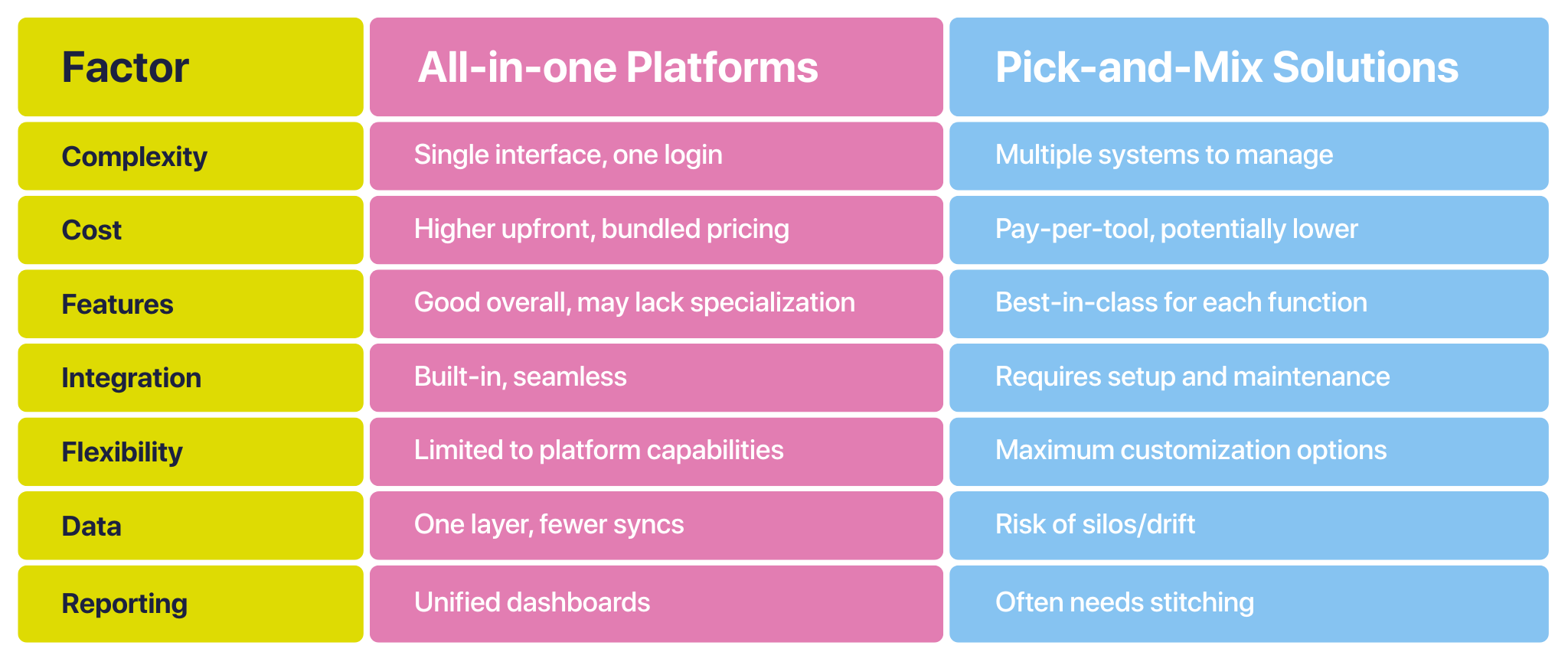
All-in-one platforms: Tools like HubSpot, Keap, or Salesforce Marketing Cloud bundle CRM, email, forms and landing pages, social publishing, analytics, and sometimes even website tools into one interface. The big advantage is simplicity. One vendor relationship. One login. One data layer across sales and marketing. Reporting is easier because all activity lives in the same place, which also reduces the overhead of connecting and babysitting multiple apps.
There are trade-offs. Bundles often carry higher list prices, and you may pay for modules you do not need. Suite components can trail best-of-breed tools in specific features. You also accept one vendor’s roadmap, pricing tiers, and limits, which can matter as your needs evolve.
Pick-and-mix stacks: You can combine Mailchimp for email, Hootsuite for social, Calendly for scheduling, and Zapier for glue. This approach maximizes flexibility. You choose the strongest tool for each job, turn features on only where you need them, and fine-tune your stack as you learn.
The downside is complexity. You manage several vendors, interfaces, permissions, and invoices. Integrations require setup and monitoring. Data can fragment across systems, which hurts attribution and team coordination. Once you add up subscriptions, connectors, and admin time, the total cost can exceed a suite.
Which to choose. If you have limited technical capacity and want adoption, unified reporting, and fewer moving parts, an all-in-one is usually the safer bet. If you need niche capabilities and can maintain APIs and webhooks, a pick-and-mix stack can win on depth and control.
Challenges of Implementing Marketing Automation, and How Cone CRM Helps
“The biggest challenge with CRM implementation is not the technology. It is getting people to actually use it. If your team does not love the system, your investment is worthless.”
— Marc Benioff, CEO of Salesforce
Marketing automation pays off, yet implementation trips up many teams. These are the common blockers and the practical fixes.
1) Tool sprawl and fragile integrations
The problem: Email, CRM, calendars, analytics, and billing live in separate apps. Connecting them takes technical skill. The result is duplicate records, broken workflows, and lost context.
Cone’s fix: One platform for CRM, automation, calling, and analytics. A single data layer keeps records in sync and removes most glue code.
2) Costs that creep up
The problem: A low entry price is followed by add-ons for users, contacts, templates, analytics, and AI. Total cost exceeds expectations.
Cone’s fix: Pricing built for SMBs and mid-market teams. Consolidation replaces multiple subscriptions and reduces integration and admin spend.
3) Steep learning curves
The problem: Complex UIs and long onboarding reduce usage. Features sit idle.
Cone’s fix: Zero-training design with drag-and-drop builders and guided flows so teams are productive on day one.
4) Low adoption on the sales floor
The problem: Reps see CRM as extra clicks and data entry. Adoption drops, so automation never fires consistently.
Cone’s fix: Built for right-brained, relationship-focused sellers. Fewer clicks, in-flow nudges, and micro-training increase daily use and data quality.
5) Losing the human touch
The problem: Over-automation produces robotic messages that erode trust.
Cone’s fix: Let AI handle repetitive tasks and enrichment while reps guide timing, tone, and offers. Personalization scales without sounding generic.
6) Content pressure
The problem: Automation needs steady content. Lean teams struggle to feed every channel.
Cone’s fix: Time back from automation plus insight dashboards. Reuse one pillar across email, SMS, and social with segment-specific tweaks.
7) Governance and data hygiene
The problem: Consent, access and export, and deletion are hard across many tools. Dirty lists hurt deliverability and reporting.
Cone’s fix: Preferences, consent logging, and list health in one place. Better deliverability, clearer attribution, and easier compliance reviews.
Bottom line: Consolidation removes the hardest setup work. Adoption rises when the tool saves clicks and helps reps sell. That is where automation starts paying real dividends.
The Future of Marketing Automation: AI and Predictive Analytics
Automation is accelerating. Artificial intelligence and predictive analytics are putting advanced capabilities within reach of SMBs and mid-market teams. What used to need enterprise budgets is now practical.
What AI adds right now:
- Personalization that learns. Systems analyze behavior, purchases, and engagement to choose content, timing, and channels for each contact. Subject lines, send times, and email blocks adapt in real time.
- Predictive lead scoring. Algorithms spot patterns that signal intent, then route high-potential leads and trigger the next best action automatically.
- Content assistance. Tools suggest angles, outline messages, and tailor wording by segment. Marketers edit and approve rather than write from scratch.
- Cross-channel orchestration. Data from email, SMS, social, and web behavior coordinates a single journey that feels consistent instead of piecemeal.
- Proactive analytics. Forecasts highlight which offers, cohorts, and seasons will perform so you can shift budget before the curve.
Why this matters:
Advanced features are increasingly affordable. Teams get time back while improving relevance. Reporting moves from “what happened” to “what will happen if we change X.”
How to prepare:
- Centralize your data. A clean, unified record makes every AI feature better.
- Start with one workflow. For example: lead capture → nurture → score → assign. Measure lift, then expand.
- Keep humans in the loop. Let AI handle grunt work, while people own message, offer, and relationship.
Smart automation does not replace the human touch. It scales it. If your platform removes clicks, unifies data, and surfaces the next best step, your team will adopt it and your customers will feel it.
FAQs
Q1: What exactly is marketing automation for SMBs?
Marketing automation uses software platforms to automatically handle repetitive marketing tasks like email campaigns, social media posting, lead nurturing, and customer follow-ups. This helps teams accomplish more with less manual effort while maintaining personalized customer experiences.
Q2: What are the main benefits of marketing automation?
Increased efficiency through task automation. Improved lead generation and nurturing. Enhanced customer engagement through personalization. Better data-driven decision making with detailed analytics. Scalability that grows with your business without proportional increases in manual work.
Q3: Is marketing automation too expensive for growing teams?
Not necessarily. Many platforms offer free plans or affordable starter pricing that scale with your growth. While advanced AI features can be costly on some platforms, solutions like Cone CRM provide sophisticated automation capabilities priced for SMBs and mid-market teams.
Q4: How does marketing automation help with lead generation and nurturing?
Automation captures leads through forms and landing pages, scores them based on engagement and behavior, and delivers personalized follow-up sequences that guide prospects through your funnel. This ensures no potential customer falls through the cracks while providing relevant content at the right time.
Q5: Can marketing automation integrate with my existing CRM system?
Most modern automation platforms integrate with popular CRM systems. Integration complexity can be a challenge. Cone CRM removes that by providing built-in CRM alongside marketing automation, ensuring seamless data flow without complex connectors.




.png)